ChromelabsCloud Freedom Reseller Plan

Stop paying for unused hosting resources. Start paying only when you earn.

Start your hosting brand with ZERO monthly cost. You earn first and pay only after you sell.

Unlimited cPanel Accounts CyberPanel & Virtualmin Pay-As-You-Go Model AI Code Analyzer 4-Layer Backup System

Use unlimited control panels like cPanel, CyberPanel, Linux panels, and Virtualmin. No limits on clients or hosting plans.

Our 4-layer backup system protects your data. Even if data is deleted by mistake or terminated, it can be recovered within 15 minutes.

Everything is fully white-label — your brand, your pricing, your clients, your profit. ChromeLabsCloud stays in the backend.

We manage the infrastructure for you: fast Indian cloud servers, AI optimization, and 24/7 backend technical support. You focus on selling and scaling.
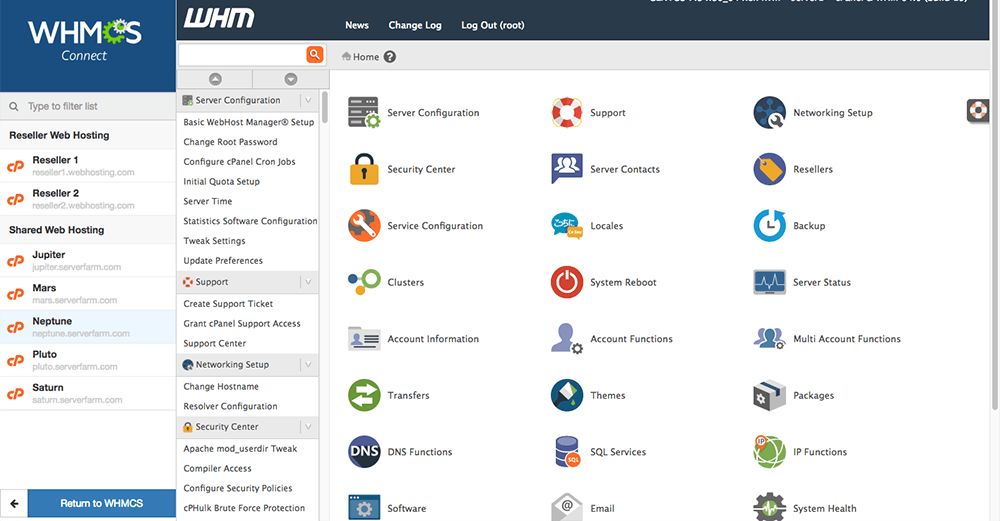
ChromelabsCloud Reseller Hosting Dashboard

ChromelabsCloud Reseller Hosting

Start without investment. Build real income. Grow into your own hosting company.

Business 1
Build Monthly Income
₹549 / mo $7 / mo
  • 50 cPanels = potential 50 paying clients every month
  • 100GB storage — handle real business websites
  • 300GB bandwidth — smooth performance for clients
  • WHM control — manage clients like a hosting company
  • Multi-technology support — attract more clients
  • 4-layer backup — avoid data loss issues
  • Turn your skills into recurring monthly income
Get Started
Business 2
Scale Faster
₹949 / mo $12 / mo
  • 100 cPanels — build strong monthly income system
  • 100GB storage — handle real business websites
  • Serve more clients without upgrading frequently
  • WHM control — grow your own hosting brand
  • Multi-tech support — handle all types of projects
  • 4-layer backup — zero fear of losing client data
  • Ideal for scaling freelancers and agencies
Scale Now
Master Reseller
Build Your Hosting Company
₹2,499 / mo $30 / mo
  • 5 WHM accounts — create your own reseller network
  • 500 cPanels — massive scaling potential
  • 500GB storage — handle real business websites
  • White-label — build your own brand identity
  • Earn from both clients and resellers
  • Multi-tech support — enterprise-level flexibility
  • 4-layer backup — full business protection
Build Business
Unlimited
No Limits. Full Power.
₹5,199 / mo $62 / mo
  • Unlimited cPanels — no growth restrictions
  • 1TB storage — manage large-scale clients
  • 2GB RAM per cPanel — high performance hosting
  • Supports cPanel, CyberPanel, Virtualmin
  • Multi-tech deployment — full flexibility
  • Built for agencies & serious hosting businesses
Go Unlimited

Tired of Paying Huge Monthly Fees on Other Reseller Hosting?

If you’re already running a reseller business, you know the problem: money goes out every month — whether business comes in or not.

The Reality with Traditional Resellers

Every month, you pay a fixed reseller fee — even when:

  • Clients delay payments
  • Some customers leave
  • Resources remain unused

Money goes out first. Revenue comes later — sometimes not at all. This pressure reduces margins and slows growth.

How ChromelabsCloud Works Differently

With ChromelabsCloud, there are no locked monthly plans. Your cost exists only when your client exists.

You earn first. Then you pay. That’s a healthier business model.

Full Technical Freedom

  • Unlimited cPanel accounts
  • CyberPanel or Virtualmin — your choice
  • No per-account pricing
  • No artificial limits

Same or Better Infrastructure

  • Fast Indian cloud servers
  • AI-optimized performance
  • Daily backups & security
  • Free migration from your current reseller

Your Current Reseller

₹X,000 fixed every month
Pay even when you don’t sell
Limits that block growth

ChromelabsCloud

₹0 fixed cost
Pay only after you earn
Scale without restriction

What is Reseller Hosting?

Reseller hosting allows you to run your own web hosting business under your brand, without owning or managing physical servers. ChromelabsCloud provides the infrastructure — you focus on clients and growth.

You Sell Hosting Under Your Brand

Create hosting plans with your pricing, branding, and client relationships. Your customers never see ChromelabsCloud.

We Manage the Infrastructure

Servers, security, uptime, and backend stability are handled by ChromelabsCloud so you don’t deal with hardware.

You Control Clients & Resources

Use WHM & cPanel to create accounts, allocate resources, suspend users, and manage everything from one panel.

Scale as Your Business Grows

Start small and upgrade resources as clients increase. No server migration stress or infrastructure rebuild.

You brand & sell Clients purchase from you You manage via WHM We power the backend

Why Choose ChromelabsCloud for Reseller Hosting?

ChromelabsCloud is built for agencies, freelancers, and serious resellers who need a stable backend — not oversold, mass-market reseller hosting.

No Overselling Policy

We capacity-plan our servers carefully. Your clients get consistent performance instead of shared chaos.

Agency-Friendly Architecture

Designed for agencies managing multiple client websites, not single personal blogs.

Full WHM & cPanel Control

Create, manage, suspend, and allocate resources independently without backend dependency.

White-Label Ready

Custom nameservers, branding, and client-facing identity under your business name.

Human Technical Support

Speak directly with engineers who understand servers, not scripted call-center replies.

Easy Growth Path

Upgrade reseller resources or move to VPS or Dedicated servers without migrating clients.

Built for real agencies & freelancers Not a mass-market reseller platform Infrastructure-first mindset Long-term business friendly

Reseller Hosting Features

Everything you need to run and grow a professional web hosting business under your brand — without managing servers.

WHM Access

Full WHM control to create, suspend, and manage multiple cPanel accounts independently.

Multiple cPanel Accounts

Create individual hosting accounts for each client with isolated resources and access.

White-Label Branding

Use your own company name, nameservers, and branding — clients never see ChromelabsCloud.

Resource Allocation Control

Define disk space, bandwidth, email limits, and usage per client from WHM.

Daily Backups

Automated backups to protect client data and ensure quick recovery when needed.

Security Stack Included

Firewall, malware protection, and hardened server configuration for safer hosting environments.

Free Migration Assistance

Guided migration support for moving client websites from other hosting providers.

Scalable Infrastructure

Upgrade reseller resources or move to VPS or Dedicated servers as your business grows.

Human Technical Support

Direct access to real engineers who understand hosting and infrastructure.

  • Powerful Features of ChromeLabsCloud

Start Your Own Hosting Company with ChromeLabsCloud WHM

ChromeLabsCloud WHM Reseller Hosting turns you from a user into a provider.

You get your own AI-powered cloud environment, full WHM + multi-cPanel access, and the freedom to sell hosting under your brand — all powered by ChromeLabsCloud OS.

ChromeLabsCloud – Global Empowerment

Empowering Every Country, Every City, Every Innovator

ChromeLabsCloud was built to break the boundaries of access. In most parts of the world, advanced cloud infrastructure is expensive, centralized, and controlled by global corporations. We believe that technology should not belong to a few — it should empower every country, every city, and every innovator to build and grow.

That’s why ChromeLabsCloud was designed as an open cloud ecosystem — where anyone can become a reseller, white-label provider, or regional cloud leader using our infrastructure, our OS, and our automation systems.

Whether you’re in a small town, a university campus, or a developing country — you can build your own hosting ecosystem, your own technology company, or your own digital hub — powered entirely by ChromeLabsCloud.

We give people access to the same level of infrastructure quality trusted by the biggest names in the world — but at affordable, human-accessible pricing. Our systems are engineered to scale without complexity — enabling individuals and organizations to grow confidently, without needing massive investments or deep technical teams.

ChromeLabsCloud is more than a cloud provider. It’s a movement of digital empowerment — connecting local innovators, agencies, and educators to global-grade infrastructure and giving them the freedom to build their own ecosystems.

When we say “Build your own cloud,” we mean it — for your city, your state, and your country.

Start with a 15-Days Free Trial

  • To avail for a 15 Days free Web Hosting trial you must have your own domain to use for trail of web hosting.
  • If you do not have a domain name registered yet Register Your Domain after that activate your 15 Days free Web Hosting trial
  • Simplified website and server management. Easy & intuitive for beginners, power-packed for the experts.
  • Packed with great features, such as one-click software installs,24/7 support .
ChromeLabs Chatbot

ChromeLabsCloud India’s Cloud Computing & Hosting Server Company

📈 Journey: 2022 → 2026 Started in 2022 as Chromelabs.in with focus on speed, stability, and reliability.

2023 → Multi-technology support (PHP, Node.js, React, Python)

2024 → Unified control (cPanel + WHM + ChromelabsCloud Panel)

2025 → Evolved into a complete cloud ecosystem (business growth + AI-ready) 

Continuously building for the future.

🌍 Today Built in India. Serving worldwide. Helping you build, deploy, and scale real applications with full control and real execution power.

Across the World users

3rd Floor, Alcazar Mall, Plot No. 498, Road No. 36, Aditya Enclave, Jubilee Hills, Hyderabad, Telangana 500033

[Hyderabad , Mumbai , Indore , Shimla India]
[ UK , US , UAE , Europe]

©2021 -2026 All Rights Reserved , ChromeLabs India LLP, Built In Hyderabad India Deployed To the World 

🔄 Earning & Career Opportunities: Jobs, Freelance & Client Projects
Introduction

To create income from client work… these 5 things are mandatory.

Even for a job and stable income… this system is required — a cloud computing server and a domain that grow with you like your career.

A cloud computing server should store your entire technical skill presence and help you show ready demos to clients instantly

(Previously we used books only to learn… now companies and clients expect live work, not theory)

A domain grows with you like your name every year your domain ranking improves… just like your career growth

What is this system?

This system is built on three core elements:

Cloud computing server

Domain that’s your identity — how you improve, how you show your work, how you grow in every technology… even for jobs you must maintain a domain and server — that is the future

Your skills with a computing server and a domain — with this combination there is fast adaptability and fast execution

Only learning is outdated Execution is what matters

You can use tools like ChatGPT or Google Gemini to search and learn anything

…but even if in future they stop giving free access, at least you should have foundation-level knowledge

AI can help you learn But AI cannot create income for you

Searching alone will not create income Execution creates income and opportunities

1. Strong Profile (Trust)

From your location, your profile must be strong.

Your website should clearly show:

Your skills

Your work (projects)

Your activity every year that grows like a career

When someone sees your profile, they should not ask questions they should directly understand your capability

This is what makes clients trust you and contact you

Even if you share your profile with HRs or recruiters, they can clearly understand what you can do

2. Online Availability (Presence)

You must be available online.

Your website

Your Google Business Profile

Clients and opportunities should be able to find you anytime

Even when you are not active, your presence should work for you

(If you are not online, for them you don’t exist)

3. Search Visibility (Discovery)

Your skills and work must appear in search — wherever they search:

Google Search

Bing Search

AI tools like ChatGPT and Google Gemini

Social media platforms

When someone searches:

Web development

Marketing services

Your name

Your location

You should appear

Post daily (at least 1–2 posts) based on your skills and work

If you are not visible… clients cannot reach you

4. Daily Activity (Growth)

You must stay active every day.

Share your work

Post your progress

Update your platforms

Your activity builds trust

When people see you active, they feel you are working

When you are inactive, they feel you stopped

Your consistency brings opportunities

5. Right Guidance (Direction)

You need the right guidance and support system — not one time, continuous.

Step-by-step guidance

Daily support when you have doubts

This helps you move faster

This avoids confusion

This keeps you in the right direction

System Realization

Without:

Skills

Cloud server

Domain

You will stay only in learning stage

Earning from clients and stable job growth is not possible

With this system:

You can start working

You can start getting paid from your place

You are not depending on anyone

You are building your own career system

Location Advantage

You don’t need to go anywhere.

You can start from where you are.

Your location does not matter

Your system and execution matter

Opportunity with ChromelabsCloud

After this program, based on your skills:

You get opportunities through mentoring

You work on real client projects

You can earn:

Monthly income

Yearly income

Based on:

Your development work

Your teaching and mentoring work

Don’t just learn… start executing.

Get clients. Get paid.

Start from your location… and scale across India

ChithraDurga Help assistance

Chithradurga website prompt

<!DOCTYPE html>

<html lang=”en”>

<head>

<meta charset=”UTF-8″>

<meta name=”viewport” content=”width=device-width, initial-scale=1.0″>

<title>Website Development in Chitradurga | Digital Marketing & SEO Karnataka</title>

<meta name=”description” content=”Website development, SEO and digital marketing services in Chitradurga covering villages and nearby districts like Davanagere, Tumakuru, Ballari and Bangalore Karnataka.”>

<link href=”https://fonts.googleapis.com/css2?family=Lato:wght@300;400;700&display=swap” rel=”stylesheet”>

<style>

*{margin:0;padding:0;box-sizing:border-box;font-family:’Lato’,sans-serif}

body{

background:radial-gradient(circle at left,#0f2d0f,#000);

color:#fff;

}

/* HERO */

.container{

display:flex;

align-items:center;

justify-content:space-between;

padding:80px 8% 40px;

gap:60px;

}

/* LEFT */

.left{

flex:1;

max-width:520px;

text-align:left;

}

.left h4{

color:#aaa;

margin-bottom:8px;

}

.left h1{

font-size:48px;

line-height:1.2;

font-weight:700;

}

.left h1 span{

color:#c6ff00;

display:block;

font-size:26px;

margin-top:5px;

}

.left p{

margin-top:14px;

color:#b5b5b5;

font-size:15px;

line-height:1.6;

}

/* BUTTON */

.buttons{

margin-top:22px;

display:flex;

}

.btn-primary{

background:#c6ff00;

color:#000;

padding:14px 26px;

border-radius:6px;

text-decoration:none;

font-weight:600;

}

/* IMAGE */

.image{

flex:1;

display:flex;

justify-content:center;

}

.image img{

width:280px;

border-radius:16px;

}

/* FULL WIDTH SEO */

.full-section{

width:100%;

padding:40px 8%;

margin-top:20px;

border-top:1px solid #222;

text-align:left;

}

.full-section h5{

color:#c6ff00;

margin-bottom:8px;

}

.full-section h3{

font-size:20px;

margin-bottom:10px;

}

.full-section p{

color:#b5b5b5;

font-size:14px;

line-height:1.6;

max-width:900px;

}

/* RESPONSIVE */

@media(max-width:900px){

.container{

flex-direction:column;

align-items:flex-start;

padding:60px 6%;

gap:30px;

}

.left{

width:100%;

text-align:left;

}

.buttons{

justify-content:flex-start;

}

.image{

width:100%;

justify-content:flex-start;

}

.image img{

width:220px;

}

.full-section{

text-align:left;

padding:30px 6%;

}

}

@media(max-width:500px){

.left h1{

font-size:32px;

}

.left h1 span{

font-size:20px;

}

}

</style>

</head>

<body>

<!– HERO –>

<div class=”container”>

<div class=”left”>

<h4>Hi, This is</h4>

<h1>

ABC <br>

<span>from Chitradurga</span>

</h1>

<p>

Web Developer & Digital Marketing Expert helping businesses grow in Chitradurga, surrounding districts, villages and across Bangalore Karnataka.

<br><br>

I build websites, run SEO and create systems that generate real clients.

</p>

<div class=”buttons”>

<a href=”https://wa.me/919999999999?text=Hi%2C%20I%20saw%20your%20website%20on%20Google%20and%20social%20media.%20I%20need%20more%20information%20about%20your%20services%20in%20Chitradurga%20and%20nearby%20districts%20like%20Davanagere%2C%20Tumakuru%2C%20Ballari.” 

class=”btn-primary”>

Connect on WhatsApp

</a>

</div>

</div>

<div class=”image”>

<img src=”https://ayeshamufeeda.myprofilecloud.cfd/myphoto.png” alt=”Profile”>

</div>

</div>

<!– FULL WIDTH SEO –>

<div class=”full-section”>

<h5>Chitradurga • Villages • Davanagere • Tumakuru • Ballari • Bangalore</h5>

<h3>

Website Development & Digital Marketing Services

</h3>

<p>

Providing website development, SEO and digital marketing services across Chitradurga including Challakere, Hiriyur, Holalkere, Hosadurga and surrounding villages, along with nearby districts and Bangalore to help businesses grow online.

</p>

</div>

</body>

</html>

<!– ================= SERVICES SECTION START ================= –>

<style>

/* SERVICES SECTION (ISOLATED – NO CONFLICT) */

.services-section{

padding:80px 8%;

background:#f5f7fb;

color:#000;

text-align:center;

}

.services-section h5{

color:#2563eb;

font-size:14px;

margin-bottom:10px;

}

.services-section h2{

font-size:32px;

margin-bottom:40px;

}

.service-grid{

display:grid;

grid-template-columns:repeat(4,1fr);

gap:20px;

}

.service-card{

background:linear-gradient(135deg,#1e3a8a,#2563eb);

color:#fff;

padding:25px;

border-radius:20px;

text-align:left;

position:relative;

transition:0.3s;

}

.service-card span{

position:absolute;

top:12px;

left:12px;

background:#000;

padding:5px 10px;

border-radius:20px;

font-size:11px;

}

.service-card h3{

margin-top:30px;

margin-bottom:10px;

font-size:18px;

}

.service-card p{

font-size:14px;

line-height:1.5;

color:#e0e7ff;

}

.service-card:hover{

transform:translateY(-6px);

box-shadow:0 10px 30px rgba(0,0,0,0.2);

}

/* TABLET */

@media(max-width:1000px){

.service-grid{

grid-template-columns:repeat(2,1fr);

}

}

/* MOBILE */

@media(max-width:600px){

.service-grid{

grid-template-columns:1fr;

}

.services-section h2{

font-size:24px;

}

}

</style>

<style>

/* SECTION */

.ai-section{

padding:80px 8%;

background:#f8fafc;

text-align:center;

}

.ai-section h2{

font-size:32px;

margin-bottom:10px;

}

.ai-section h2 span{

color:#2563eb;

}

.ai-section p{

color:#555;

margin-bottom:40px;

font-size:15px;

}

/* GRID */

.ai-grid{

display:grid;

grid-template-columns:repeat(3,1fr);

gap:20px;

}

/* CARD */

.ai-card{

background:#fff;

border-radius:16px;

padding:20px;

text-align:left;

border:2px solid #e5e7eb;

transition:0.3s;

position:relative;

}

.ai-card h3{

font-size:18px;

margin-bottom:10px;

color:#111;

}

.ai-card p{

font-size:14px;

color:#555;

line-height:1.5;

}

/* HOVER */

.ai-card:hover{

transform:translateY(-6px);

border-color:#2563eb;

box-shadow:0 10px 25px rgba(0,0,0,0.1);

}

/* COVERAGE */

.ai-coverage{

margin-top:30px;

font-size:14px;

color:#444;

max-width:900px;

margin-left:auto;

margin-right:auto;

}

/* RESPONSIVE */

@media(max-width:1000px){

.ai-grid{

grid-template-columns:repeat(2,1fr);

}

}

@media(max-width:600px){

.ai-grid{

grid-template-columns:1fr;

}

.ai-section h2{

font-size:24px;

}

}

</style>


<!– ================= AI + WEB TRAINING SECTION START ================= –>

<style>

.ai-section{

padding:80px 8%;

background:#f8fafc;

text-align:center;

color:#111;

}

/* HEADINGS */

.ai-section h2{

font-size:32px;

margin-bottom:10px;

color:#111;

}

.ai-section h2 span{

color:#2563eb;

font-weight:700;

}

.ai-section .sub{

color:#555;

margin-bottom:40px;

font-size:15px;

}

/* GRID */

.ai-grid{

display:grid;

grid-template-columns:repeat(3,1fr);

gap:20px;

}

/* CARD */

.ai-card{

background:#ffffff;

border-radius:16px;

padding:22px;

text-align:left;

border:2px solid #e5e7eb;

transition:0.3s;

position:relative;

}

.ai-card h3{

font-size:18px;

margin-bottom:10px;

color:#111;

}

.ai-card p{

font-size:14px;

color:#555;

line-height:1.5;

}

/* HOVER EFFECT */

.ai-card:hover{

transform:translateY(-6px);

border-color:#2563eb;

box-shadow:0 10px 25px rgba(0,0,0,0.08);

}

/* COVERAGE */

.ai-coverage{

margin-top:30px;

font-size:14px;

color:#444;

max-width:900px;

margin-left:auto;

margin-right:auto;

line-height:1.6;

}

/* RESPONSIVE */

@media(max-width:1000px){

.ai-grid{

grid-template-columns:repeat(2,1fr);

}

}

@media(max-width:600px){

.ai-grid{

grid-template-columns:1fr;

}

.ai-section h2{

font-size:24px;

}

}

</style>

<section class=”ai-section”>

<h2>

Learn Real Skills & <span>Earn from Chitradurga</span>

</h2>

<p class=”sub”>

Practical training + live projects + income system using ChromelabsCloud

</p>

<div class=”ai-grid”>

<div class=”ai-card”>

<h3>1. Website Development</h3>

<p>

Learn how to write code and build websites, then deploy them live using ChromelabsCloud servers.

</p>

</div>

<div class=”ai-card”>

<h3>2. Domain & Hosting Setup</h3>

<p>

Understand domains, DNS and how to connect your website to hosting from scratch.

</p>

</div>

<div class=”ai-card”>

<h3>3. cPanel Mastery</h3>

<p>

Learn how to manage files, domains and databases using cPanel professionally.

</p>

</div>

<div class=”ai-card”>

<h3>4. Live Deployment</h3>

<p>

Upload your code into public_html and make your website live globally.

</p>

</div>

<div class=”ai-card”>

<h3>5. ChatGPT for Development</h3>

<p>

Use ChatGPT to generate code, fix bugs and build websites faster with real workflow.

</p>

</div>

<div class=”ai-card”>

<h3>6. Image to Code</h3>

<p>

Convert designs or images into working code and edit them live without confusion.

</p>

</div>

<div class=”ai-card”>

<h3>7. Backup System</h3>

<p>

Learn how to take full backups and restore your website safely anytime.

</p>

</div>

<div class=”ai-card”>

<h3>8. Client Projects & Freelancing</h3>

<p>

Work on real client projects and start earning from Chitradurga and nearby districts.

</p>

</div>

<div class=”ai-card”>

<h3>9. Earn by Teaching</h3>

<p>

With ChromelabsCloud, you can also earn by teaching others and building your own system.

</p>

</div>

</div>

<p class=”ai-coverage”>

Training available across Chitradurga including Challakere, Hiriyur, Holalkere, Hosadurga, nearby villages and surrounding districts like Davanagere, Tumakuru, Ballari and Bangalore.

</p>

</section>

<!– ================= AI + WEB TRAINING SECTION END ================= –>

</section>


<section class=”services-section”>

<h5>What We Offer</h5>

<h2>Digital Services in Chitradurga & Surrounding Districts</h2>

<div class=”service-grid”>

<div class=”service-card”>

<span>Local Business</span>

<h3>Website Development</h3>

<p>

Professional websites for businesses in Chitradurga, Challakere, Hiriyur, Holalkere and nearby villages to attract more clients.

</p>

</div>

<div class=”service-card”>

<span>Google Ranking</span>

<h3>SEO Optimization</h3>

<p>

Rank your business on Google in Chitradurga, Davanagere, Tumakuru and Ballari using strong local SEO strategies.

</p>

</div>

<div class=”service-card”>

<span>Lead Generation</span>

<h3>Digital Marketing</h3>

<p>

Get more customers through social media marketing and ads across Karnataka including Bangalore.

</p>

</div>

<div class=”service-card”>

<span>Automation</span>

<h3>AI Business Systems</h3>

<p>

Automate customer handling, leads and operations using AI tools for faster business growth.

</p>

</div>

<div class=”service-card”>

<span>High Speed</span>

<h3>Cloud Hosting</h3>

<p>

Secure and fast hosting solutions for websites with high uptime and performance support.

</p>

</div>

<div class=”service-card”>

<span>Income Focus</span>

<h3>Freelancing Training</h3>

<p>

Learn website development and digital marketing to earn from Chitradurga, villages and nearby districts.

</p>

</div>

<div class=”service-card”>

<span>Brand Growth</span>

<h3>Social Media Marketing</h3>

<p>

Increase your business visibility on Instagram, Facebook and local platforms to reach more customers.

</p>

</div>

<div class=”service-card”>

<span>Complete Setup</span>

<h3>Website + SEO Package</h3>

<p>

End-to-end solution including website, SEO and marketing setup for long-term business growth.

</p>

</div>

</div>

</section>

<!– ================= SERVICES SECTION END ================= –>

<!DOCTYPE html>

<html lang=”en”>

<head>

<meta charset=”UTF-8″>

<meta name=”viewport” content=”width=device-width, initial-scale=1.0″>

<title>Contact | Website Developer in Chitradurga</title>

<style>

*{

margin:0;

padding:0;

box-sizing:border-box;

font-family: ‘Segoe UI’, sans-serif;

}

body{

background:#05080f;

color:#fff;

}

/* SECTION */

.contact-section{

padding:80px 8%;

display:flex;

justify-content:space-between;

align-items:flex-start;

gap:60px;

}

/* LEFT */

.left{

flex:1;

}

.left small{

letter-spacing:2px;

color:#888;

font-size:13px;

}

.left h1{

font-size:60px;

line-height:1.1;

margin-top:20px;

font-weight:300;

}

/* RIGHT */

.right{

flex:1;

display:flex;

gap:40px;

border-left:1px solid #333;

padding-left:40px;

}

.box{

flex:1;

}

.box h3{

font-size:26px;

margin-bottom:10px;

}

.box p{

color:#aaa;

font-size:15px;

line-height:1.6;

margin-bottom:20px;

}

/* BUTTON */

.btn{

display:inline-block;

padding:14px 26px;

background:#c6ff00;

color:#000;

font-weight:600;

text-decoration:none;

border-radius:6px;

transition:0.3s;

}

.btn:hover{

background:#a8e600;

}

/* EMAIL LINK */

.email{

color:#c6ff00;

text-decoration:none;

}

/* RESPONSIVE */

@media(max-width:900px){

.contact-section{

flex-direction:column;

gap:40px;

}

.right{

flex-direction:column;

border-left:none;

padding-left:0;

}

.left h1{

font-size:40px;

}

}

@media(max-width:500px){

.left h1{

font-size:32px;

}

}

</style>

</head>

<body>

<section class=”contact-section”>

<!– LEFT –>

<div class=”left”>

<small>CONNECT WITH ME</small>

<h1>

Let’s build something<br>

powerful for your business

</h1>

</div>

<!– RIGHT –>

<div class=”right”>

<div class=”box”>

<h3>Phone</h3>

<p>+91 99999 99999</p>

<h3>Address</h3>

<p>

Chitradurga, Karnataka<br>

Serving nearby districts: Davanagere, Tumakuru, Ballari, and villages across region

</p>

</div>

<div class=”box”>

<h3>Email</h3>

<p>

<a href=”mailto:hello@yourdomain.com?subject=Service Inquiry&body=Hi, I saw your website and I need more information about your services in Chitradurga and nearby districts.” class=”email”>

hello@yourdomain.com

</a>

</p>

<a href=”https://wa.me/919999999999?text=Hi%2C%20I%20came%20across%20your%20website%20on%20Google%20and%20social%20media.%20I%20am%20interested%20in%20your%20services%20in%20Chitradurga%20and%20nearby%20districts.%20Please%20share%20more%20details.” 

class=”btn”>

Let’s Grow Your Business →

</a>

</div>

</div>

</section>

</body>

</html>

image to code

You are an expert front-end developer, UI/UX designer, and responsive design specialist.

Your task is to carefully analyze the provided image and convert it into a COMPLETE, PRODUCTION-READY website.

⚠️ STRICT INSTRUCTIONS:

  1. Generate ONLY ONE FILE → index.html
  2. Do NOT provide any explanation
  3. Do NOT use markdown
  4. Do NOT skip any section from the design
  5. The design must be EXACTLY SAME as the image (pixel-perfect as much as possible)

⚙️ DEVELOPMENT RULES:

  • Use pure HTML, CSS, and JavaScript
  • Write all CSS inside <style> tag
  • Write all JavaScript inside <script> tag
  • Do NOT use external frameworks unless necessary

📱 RESPONSIVENESS (VERY IMPORTANT):

  • Fully responsive for:

  – Mobile

  – Tablet

  – Desktop

  • Maintain SAME design structure across all devices
  • Do NOT break layout or alignment
  • Use proper Flexbox / Grid for responsiveness
  • Ensure spacing, font sizes, and sections scale correctly

🎨 UI/UX REQUIREMENTS:

  • Match fonts, colors, spacing, and layout exactly
  • Maintain visual hierarchy
  • Smooth alignment and clean structure
  • Buttons, sections, and cards must match the design

🚫 DO NOT:

  • Change design structure
  • Remove any element
  • Add unnecessary content
  • Distort proportions

✅ OUTPUT FORMAT:

Return ONLY the complete index.html file code.

Deploy Your Website in 1 Click Using ChromeLabsCloud

Deploy Your Website in 1 Click Using ChromeLabsCloud

After generating your index.html file using AI tools like ChatGPT, Google Gemini, or Claude, follow these simple steps to make your website live:

📂 Step 1: Upload Your File to cPanel

  • Login to your ChromeLabsCloud cPanel
  • Open File Manager
  • Navigate to the public_html folder
  • Create a file named index.html (if it doesn’t exist)
  • Open the file and paste your complete AI-generated code
  • Click Save

🌐 Step 2: Make Your Website Live

  • Once you save the file, your website becomes live instantly
  • Open your domain name in a browser
  • You will see your website running live on the internet

✏️ Step 3: Edit Without Coding (HTML Live Editor)

  • Go to cPanel → File Manager → public_html
  • Right-click on index.html
  • Click on HTML Editor / Edit (ChromeLabsCloud Live Editor)
  • Now you can edit your website visually

✔ No coding knowledge required
✔ Make changes anytime
✔ Save and see updates instantly

This is a paid internship program (one-time registration fee).
This program is designed to give you real practical experience with live server access.


🎓 What You Will Get:

✔ Live Classes
✔ Real Cloud Server Access
✔ Hands-on Website Development
✔ Certification after Completion


Start Your Registration:

Click here:
https://user.chromelabscloud.com/cart.php?a=add&pid=71

⚠️ Important:
After clicking the registration link, you must follow the steps below carefully to complete your enrollment.


📌 Follow These Steps:

1️⃣ Select “Subdomain from ChromelabsCloud”
2️⃣ Enter your name (no spaces) → Click Check Availability
3️⃣ Click Automatically Verify
4️⃣ Proceed to Checkout
5️⃣ Create your account (fill all details carefully)
6️⃣ Click Complete Order
7️⃣ Make payment to confirm your slot


📩 After payment, you will receive invoice confirmation
Your internship access and updates will be shared shortly

Individual & Professional
Perfect for execution & career growth
₹5000 / 7days Training , OneYear ecosystem acess
Get Started

Already have account?

Login

✔ Subdomain access for one year

✔ ChromelabsCloud platform access

✔ Cloud computing server usage

✔ Store & showcase your skills

✔ Deploy real-time projects

✔ Technology upgrades support

✔ Daily guidance access

✔ Client-ready execution system